Portfolio

Real estate automation, demonstrated step by step.

Each project shows the business problem, the solution, how the workflow runs, the tools involved and the benefits. Open any project to see its workflow diagram and screenshots.

14 real n8n builds with screenshots Concept demos clearly labelled

About these projects. The projects below are personal demonstrations and concept builds, created to show how each system works. They are not client case studies and include no client results. Client projects will be labelled separately and shared only with permission.

Automation DemoWorkflow DemonstrationConcept Project
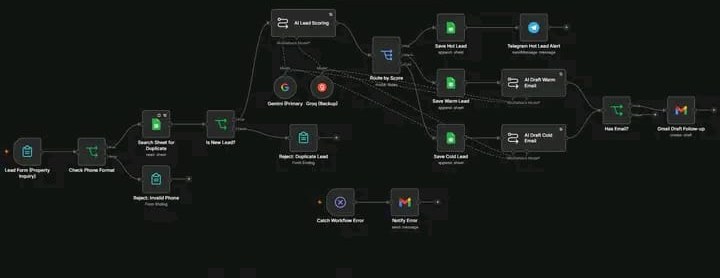
Real screenshotn8n workflow: lead form, phone check, duplicate search, AI lead scoring with Gemini and Groq, routing by score to hot, warm and cold branches, Telegram alert, AI-drafted emails, Gmail draft follow-up and an error handler
Automation DemoAI Automation

AI Lead Scoring and Instant Follow-Up

Problem
Inquiries come in but replies are slow, so customers go elsewhere.
Solution
An n8n workflow validates each property inquiry, checks Google Sheets for duplicates and uses AI to score the lead.
How it runs
View workflow 5 stages · 6 tools
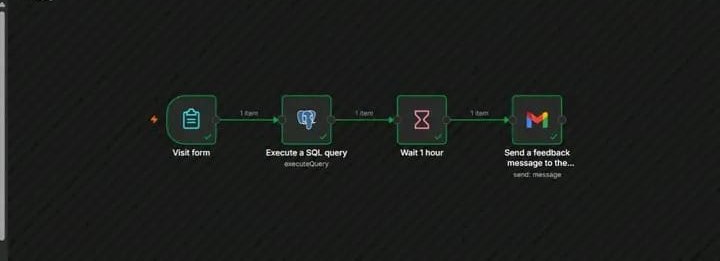
Real screenshotn8n workflow: visit form, SQL query, one-hour wait, then a Gmail feedback request
Automation DemoAI Automation

AI-Powered Customer Feedback Automation

Problem
Feedback arrives in scattered forms and is rarely analysed.
Solution
An n8n workflow with an AI agent reads and scores every submission.
How it runs
View workflow 5 stages · 6 tools
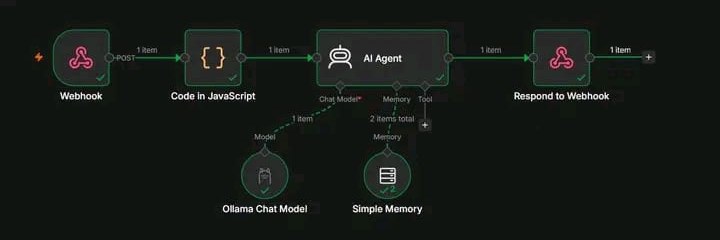
Real screenshotn8n workflow: Webhook, Code in JavaScript, AI Agent with Ollama Chat Model and Simple Memory, then Respond to Webhook
Automation DemoAI Agents

Local AI Customer Feedback Analysis (Llama 3 via Ollama)

Problem
Raw feedback is messy and slow to act on.
Solution
A web form sends each piece of feedback to an n8n webhook, where it is validated and analysed by a local Llama 3 agent.
How it runs
View workflow 4 stages · 6 tools
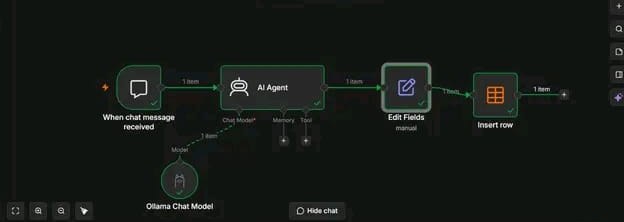
Real screenshotn8n workflow: chat message trigger, AI Agent with Ollama Chat Model, Edit Fields, then Insert row
Automation DemoAI Chatbots

AI Lead Classification and Reply System (Ollama)

Problem
Inquiries arrive as unstructured messages.
Solution
An n8n AI Agent running on a local Ollama model turns each message into structured fields and a ready-to-send reply.
How it runs
View workflow 4 stages · 5 tools
Real screenshotn8n workflow: form trigger, ticket classification, routing to several Gmail notifications, a check that sends an alert, a Google Sheets step and a customer email
Automation DemoAI Automation

Customer Support Ticket Automation

Problem
Support requests land in one inbox and wait to be read, sorted and forwarded by hand.
Solution
Each submitted ticket is classified automatically and routed by type to the right team by email.
How it runs
View workflow 5 stages · 3 tools
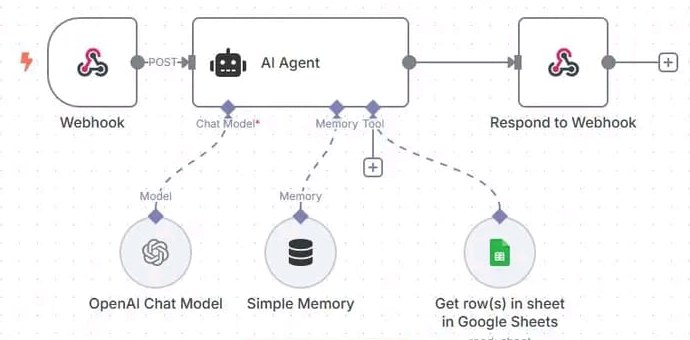
Real screenshotn8n workflow: Webhook, AI Agent with OpenAI Chat Model, Simple Memory and a Google Sheets tool, then Respond to Webhook
Automation DemoAI Chatbots

AI-Powered WhatsApp Chatbot

Problem
Online sellers get many WhatsApp messages a day asking about prices, availability, how to order and delivery status.
Solution
Incoming WhatsApp messages reach n8n through UltraMsg.
How it runs
View workflow 4 stages · 7 tools
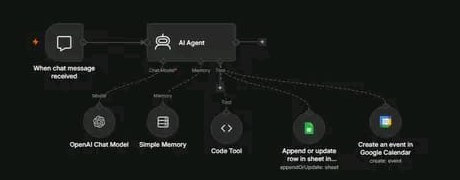
Real screenshotn8n workflow: chat trigger and AI Agent connected to an OpenAI Chat Model, Simple Memory, a Code Tool, a Google Sheets append-or-update tool and a Google Calendar create-event tool
Automation DemoAI Agents

AI Agent That Takes Action (Sheets and Calendar)

Problem
Most chatbots can only talk.
Solution
An n8n AI Agent with an OpenAI model, conversation memory and a controlled set of tools: a Code Tool for custom logic, Google Sheets for records and Google Calendar for scheduling.
How it runs
View workflow 4 stages · 7 tools
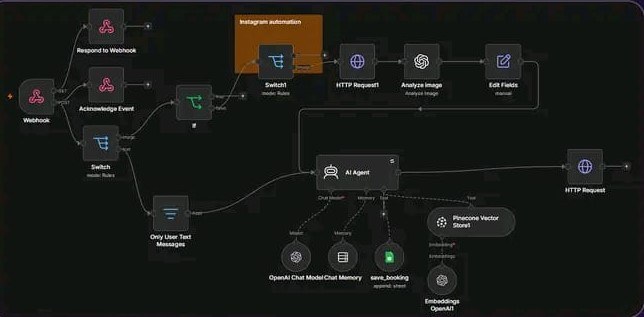
Real screenshotn8n workflow: webhook with acknowledgement, switches routing text and image messages, image analysis with OpenAI, an AI Agent with OpenAI chat model, chat memory, a save_booking Google Sheets tool and a Pinecone vector store, then an HTTP request reply
Automation DemoAI Chatbots

Instagram DM AI Agent with Image Understanding

Problem
Replying to every Instagram DM by hand is slow, and slow replies lose customers.
Solution
An n8n workflow receives each Instagram message and sends images through OpenAI image analysis.
How it runs
View workflow 5 stages · 6 tools
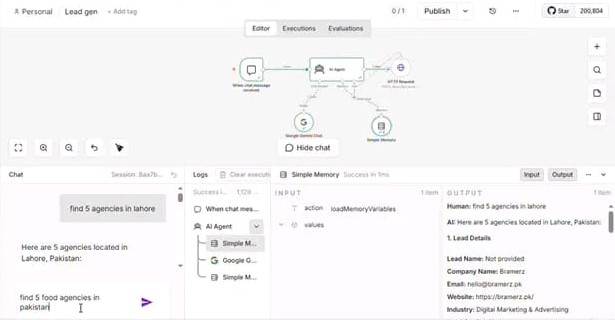
Real screenshotn8n editor showing a chat trigger, AI Agent with Google Gemini Chat Model, Simple Memory and HTTP Request, with a test chat asking for agencies in Lahore and the structured lead details in the output panel
Automation DemoAI Agents

AI Lead Generation Agent (Google Gemini)

Problem
Researching potential leads by hand means searching, opening websites and copying contact details into a list, which takes hours for every new market.
Solution
An n8n AI Agent powered by Google Gemini reads the request, retrieves relevant business information through an API integration and returns each lead in a consistent format.
How it runs
View workflow 4 stages · 5 tools
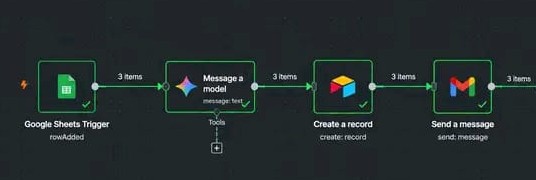
Real screenshotn8n workflow: Google Sheets trigger on row added, Message a model, Airtable create record, Gmail send message, with three items passing through each step
Automation DemoAI Automation

Client Enquiry AI Response System

Problem
Every enquiry needs a careful, professional reply and a record kept.
Solution
When a new enquiry row arrives in Google Sheets, an AI model reads it and drafts a professional response.
How it runs
View workflow 4 stages · 5 tools
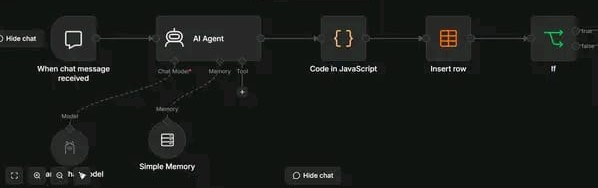
Real screenshotn8n workflow: chat trigger, AI Agent with a local chat model and Simple Memory, Code in JavaScript, Insert row, then an If node
Automation DemoAI Agents

AI Personal Expense Assistant (Local AI)

Problem
Recording every expense by hand in a spreadsheet or app is tedious, so entries get skipped and records fall behind.
Solution
An n8n AI Agent running Qwen 2.5 3B locally through Ollama reads each message and extracts the expense details.
How it runs
View workflow 4 stages · 6 tools
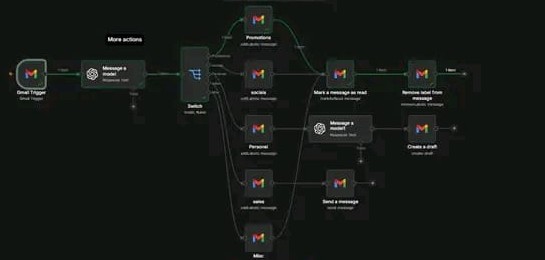
Real screenshotn8n workflow: Gmail trigger, an AI model, a Switch routing to Promotions, Socials, Personal, Sales and Misc labels, with steps to mark as read, remove labels, draft a reply and send a message
Automation DemoAI Automation

AI Booking Agent: Email Triage and Routing

Problem
A business inbox mixes promotions, social notifications, personal messages and sales or booking requests.
Solution
A Gmail trigger passes each new email to an AI model that classifies it.
How it runs
View workflow 5 stages · 3 tools
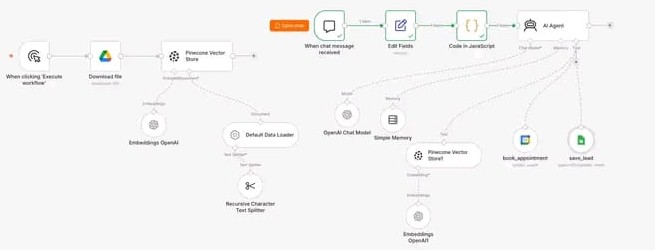
Real screenshotn8n workflow: a knowledge base pipeline from Google Drive through a text splitter and OpenAI embeddings into Pinecone, and a chat flow with Edit Fields, JavaScript and an AI Agent using OpenAI, memory, a Pinecone retriever and book_appointment and save_lead tools
Automation DemoAI Chatbots

AI Booking Chatbot for a Cleaning Business (RAG)

Problem
A service business's website chatbot only answers FAQs.
Solution
An n8n AI agent uses a Pinecone knowledge base for pricing, services and policies.
How it runs
View workflow 5 stages · 8 tools
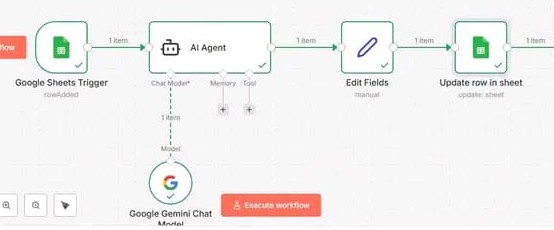
Real screenshotn8n workflow: Google Sheets trigger on row added, AI Agent with Google Gemini Chat Model, Edit Fields, then Update row in sheet
Automation DemoAI Automation

AI Lead Qualification in Google Sheets (Gemini)

Problem
New leads pile up in a spreadsheet and someone has to read each one, judge it and fill in the details by hand, which is slow and inconsistent.
Solution
A Google Sheets trigger sends every new row to an AI agent running on Google Gemini.
How it runs
View workflow 4 stages · 4 tools
Concept ProjectAI Automation

Automated Lead Follow-Up System

Problem
A potential customer enquires, but the team is busy.
Solution
An automation captures each new enquiry, qualifies it against set criteria and triggers timely follow-ups.
How it runs
View workflow 4 stages · 5 tools
Automation DemoAI Agents

AI-Powered Property Inquiry Assistant

Problem
Agents answer the same questions about price, size, parking and availability many times a day, often outside working hours.
Solution
The assistant searches a structured listing sheet for the property in question, answers only from that data, and hands off anything it can't answer.
How it runs
View workflow 5 stages · 5 tools
Workflow DemonstrationAI Automation

Automated Buyer Lead Follow-Up System

Problem
Most buyer leads need several touches over weeks or months.
Solution
A scheduled workflow sends personalised emails and texts at set intervals, references the buyer's stated criteria, and pauses as soon as the buyer replies or books.
How it runs
View workflow 5 stages · 5 tools
Automation DemoAI Chatbots

AI Real Estate Website Chatbot

Problem
Website visitors leave without contacting you when answers aren't immediate, especially evenings and weekends.
Solution
A chatbot trained on approved site content and FAQs greets visitors, answers questions, asks a few qualifying questions and captures contact details.
How it runs
View workflow 5 stages · 5 tools
Workflow DemonstrationAI Automation

Property Viewing and Appointment Scheduling

Problem
Booking a viewing takes several messages, calendars get double-booked and no-shows waste time.
Solution
Prospects choose from live agent availability.
How it runs
View workflow 5 stages · 5 tools
Automation DemoAI Automation

Automated Real Estate CRM Management

Problem
CRM data goes out of date because updating stages and notes after every call, email and booking is tedious.
Solution
Workflows listen for events across email, calendar, forms and e-signature tools and update the right CRM fields and tasks.
How it runs
View workflow 5 stages · 5 tools
Concept ProjectAI Agents

AI-Powered Seller Inquiry Management

Problem
Seller leads are valuable but often arrive with very little information, so the first call is spent collecting basics.
Solution
An AI agent asks for property type, size, condition and timeline, prepares a seller brief for the agent and offers a valuation appointment.
How it runs
View workflow 5 stages · 6 tools
Concept ProjectAI Agents

Real Estate Administrative AI Agent

Problem
Agents and coordinators lose hours to small admin tasks that interrupt client work.
Solution
Team members send requests in plain language through chat or email.
How it runs
View workflow 5 stages · 6 tools
Workflow DemonstrationAI Automation

Automated Property Listing Preparation

Problem
Preparing a listing means collecting details, writing descriptions and re-entering the same information in multiple places.
Solution
An intake form becomes the single source of listing data.
How it runs
View workflow 5 stages · 5 tools
Automation DemoAI Agents

AI Real Estate Email Assistant

Problem
Busy inboxes mix leads, client updates, vendor emails and newsletters, and important messages get buried.
Solution
The assistant classifies each email, drafts replies for routine requests using your templates and knowledge, and saves them as drafts for review.
How it runs
View workflow 5 stages · 4 tools
Workflow DemonstrationAI Automation

Automated Lead Nurturing and Reactivation

Problem
Past inquiries and old leads sit untouched in the CRM, even though some of them will buy, sell or rent again.
Solution
The workflow segments inactive contacts, sends relevant check-ins and market updates, and alerts agents when someone responds.
How it runs
View workflow 5 stages · 4 tools
Concept ProjectAI Automation

Real Estate Marketing Workflow Automation

Problem
Every new listing, price change and open house needs marketing, and preparing it from scratch each time is slow.
Solution
Listing events trigger AI-drafted content for social posts and email updates.
How it runs
View workflow 5 stages · 5 tools
Automation DemoAI Automation

Automated Real Estate Business Reporting

Problem
Reporting means exporting data from several tools and building spreadsheets by hand, so it rarely happens on time.
Solution
A scheduled workflow gathers data from the CRM, forms and calendar, writes it to a reporting sheet, and sends an AI-written summary of notable changes.
How it runs
View workflow 5 stages · 5 tools
Automation DemoAI Automation

AI Lead Scoring and Instant Follow-Up

A working workflow that checks every inquiry form instantly, uses AI to sort leads into Hot, Warm and Cold, alerts the team about hot leads and prepares a personalised follow-up email for the rest. Demo built for real estate and customisable for other service businesses.

Business problem

Inquiries come in but replies are slow, so customers go elsewhere. Duplicate and invalid entries waste time, and nobody knows which leads to call first.

Proposed solution

An n8n workflow validates each property inquiry, checks Google Sheets for duplicates and uses AI to score the lead. Hot leads trigger an instant team alert, while warm and cold leads get an AI-drafted follow-up email in Gmail.

Benefits

  • Faster replies, so fewer lost customers
  • The team knows which leads to call first
  • Every inquiry saved in a clean Google Sheet
  • Works for real estate, clinics, coaching centres, agencies and service businesses

How each lead is handled

  • Hot: saved and the team is alerted immediately
  • Warm: saved with an AI-drafted, personalised follow-up email
  • Cold: saved with a lighter AI-drafted follow-up email
  • Alerts: can go to WhatsApp, Telegram, Slack, SMS or email

Workflow diagram

  1. TriggerInquiry formProperty inquiry
  2. ActionValidate & dedupePhone check, sheet search
  3. AI stepAI lead scoringHot, warm or cold
  4. DecisionRoute by scoreSave to sheet
  5. ActionAlert or draftTelegram alert, Gmail draft
TriggerAI step ActionDecision Human check

How the workflow operates

  1. A property inquiry form is submitted.
  2. The workflow checks the phone number format and rejects invalid entries.
  3. It searches the Google Sheet for duplicates and rejects repeat leads.
  4. AI lead scoring (Gemini as primary, Groq as backup) rates the lead, and the workflow routes it by score.
  5. Hot leads are saved and the team gets an instant Telegram alert.
  6. Warm and cold leads are saved, AI drafts a personalised email, and a Gmail draft follow-up is created when an email address is available.
  7. If anything fails, an error handler sends a notification by email.

Tools and integrations

n8nGoogle SheetsGeminiGroqTelegramGmail

Screenshots from the build

n8n workflow: lead form, phone check, duplicate search, AI lead scoring with Gemini and Groq, routing by score to hot, warm and cold branches, Telegram alert, AI-drafted emails, Gmail draft follow-up and an error handler
The n8n workflow: validation and duplicate checks, AI scoring with a backup model, three routes by score, and an error handler.
Want something similar for your business?I'll adapt this workflow to your tools and process.
Request a Similar Solution
Automation DemoAI Automation

AI-Powered Customer Feedback Automation

A working system that collects customer feedback, uses AI to analyse sentiment, stores everything in a database, updates a live dashboard and routes issues to a manager automatically.

Business problem

Feedback arrives in scattered forms and is rarely analysed. Unhappy customers can go unnoticed, positive comments are lost, and nobody has a clear view across branches.

Proposed solution

An n8n workflow with an AI agent reads and scores every submission. It categorises the feedback, saves the customer and feedback to PostgreSQL, updates a Google Sheets dashboard and sends the right notification.

Benefits

  • Every piece of feedback is analysed, not just read
  • Unhappy customers reach a manager quickly
  • One dashboard across all branches
  • Positive comments collected for testimonials

Workflow diagram

  1. TriggerFeedback inCustomer form
  2. AI stepAI analysisSentiment and category
  3. ActionStorePostgreSQL record
  4. DecisionRouteTestimonial or manager
  5. ActionDashboard + emailSheets and Gmail
TriggerAI step ActionDecision Human check

How the workflow operates

  1. A customer submits feedback through a form.
  2. An AI agent (OpenAI) analyses the message, categorises it and generates a sentiment score.
  3. The complete customer details and feedback are stored in PostgreSQL.
  4. A centralised Google Sheets dashboard updates with totals, branch counts and recent alerts.
  5. Positive feedback is saved for potential testimonials; negative feedback is routed to the manager.
  6. Gmail notifications go out automatically, and a follow-up feedback request is sent after a visit.

Tools and integrations

n8nAI AgentOpenAIPostgreSQLGoogle SheetsGmail

Screenshots from the build

n8n workflow: visit form, SQL query, one-hour wait, then a Gmail feedback request
Follow-up workflow in n8n: a visit triggers a feedback request by email an hour later.
Google Sheets feedback dashboard showing totals by sentiment, counts per branch and recent alerts with severity
The live feedback dashboard in Google Sheets. Customer names are blurred for privacy.
Want something similar for your business?I'll adapt this workflow to your tools and process.
Request a Similar Solution
Automation DemoAI Agents

Local AI Customer Feedback Analysis (Llama 3 via Ollama)

An end-to-end workflow that turns raw customer feedback into structured, prioritised insights, with the AI running 100% locally on Ollama and Llama 3. No cloud AI is involved.

Business problem

Raw feedback is messy and slow to act on. Sending sensitive customer messages to cloud AI services also raises privacy questions and adds per-token costs.

Proposed solution

A web form sends each piece of feedback to an n8n webhook, where it is validated and analysed by a local Llama 3 agent. The structured result is returned straight to a clean dashboard in the web UI.

Benefits

  • Customer data stays inside your own environment
  • No per-token AI costs
  • Full control over the pipeline
  • Messy feedback becomes prioritised next steps

What the AI returns for every piece of feedback

  • Sentiment: positive, negative or neutral
  • Main issue: the customer's key concern or appreciation
  • Priority: low, medium or high
  • Recommended action: what the business should do next
  • Summary: a short, clear explanation

Workflow diagram

  1. TriggerWebhookFeedback from web UI
  2. ActionValidateClean the input
  3. AI stepLocal AI agentLlama 3 via Ollama
  4. ActionRespondResult to dashboard
TriggerAI step ActionDecision Human check

How the workflow operates

  1. A user enters the customer's name, feedback category and message in a custom web interface.
  2. An n8n Webhook receives the data.
  3. A JavaScript Code node validates and cleans the input.
  4. An AI Agent powered by Llama 3, running locally through Ollama, analyses the feedback.
  5. A Respond to Webhook node returns the structured result to the web UI, where it is shown on a dashboard.

Tools and integrations

n8nWebhookJavaScript (Code node)AI AgentOllamaLlama 3

Screenshots from the build

n8n workflow: Webhook, Code in JavaScript, AI Agent with Ollama Chat Model and Simple Memory, then Respond to Webhook
The n8n workflow: webhook in, JavaScript validation, a local Llama 3 agent through Ollama, and the response back to the web UI.
Want something similar for your business?I'll adapt this workflow to your tools and process.
Request a Similar Solution
Automation DemoAI Chatbots

AI Lead Classification and Reply System (Ollama)

A chat-based workflow that reads each customer inquiry, works out the service requested, extracts requirements and budget, sets a priority and writes a professional reply. Every inquiry and AI response is saved to an n8n Data Table.

Business problem

Inquiries arrive as unstructured messages. Someone has to read each one, work out what the customer wants and how urgent it is, write a reply and log the details by hand.

Proposed solution

An n8n AI Agent running on a local Ollama model turns each message into structured fields and a ready-to-send reply. Edit Fields organises the output, and an Insert Row step stores it in a Data Table.

Benefits

  • Every inquiry understood and logged automatically
  • Clear priorities so urgent leads get attention first
  • Consistent, professional replies
  • Structured data from unstructured messages

What the AI extracts from every inquiry

  • Service: what the customer is asking for
  • Requirements: the project details in the message
  • Budget: pulled out of the text
  • Priority: High, Medium or Low
  • Reply: a professional response ready to send

Workflow diagram

  1. TriggerChat messageCustomer inquiry
  2. AI stepAI agentService, budget, priority
  3. ActionEdit FieldsStructure the output
  4. ActionInsert rowSave to Data Table
TriggerAI step ActionDecision Human check

How the workflow operates

  1. A customer sends a message through the chat trigger.
  2. An AI Agent (Ollama chat model) identifies the requested service.
  3. It extracts the project requirements and budget from the message.
  4. It classifies the lead as High, Medium or Low priority and writes a professional reply.
  5. Edit Fields organises the AI output, and Insert Row saves the inquiry and response in an n8n Data Table.

Tools and integrations

n8nAI AgentOllamaEdit Fieldsn8n Data Tables

Screenshots from the build

n8n workflow: chat message trigger, AI Agent with Ollama Chat Model, Edit Fields, then Insert row
The n8n workflow: chat trigger, AI agent on a local Ollama model, Edit Fields and Insert Row.
n8n Data Table of customer messages and AI responses, with one response expanded showing service, requirements, budget, priority and reply
The Data Table of saved inquiries. The expanded row shows the service, requirements, budget, priority and reply the AI produced.
Want something similar for your business?I'll adapt this workflow to your tools and process.
Request a Similar Solution
Automation DemoAI Automation

Customer Support Ticket Automation

An n8n workflow that classifies each complaint, routes the ticket to the right place, sends alerts, records it in Google Sheets and emails the customer, all automatically.

Business problem

Support requests land in one inbox and wait to be read, sorted and forwarded by hand. Urgent issues can sit unnoticed, and customers are left unsure whether anyone received their message.

Proposed solution

Each submitted ticket is classified automatically and routed by type to the right team by email. Alerts go out where needed, every ticket is logged in Google Sheets, and the customer gets an email reply.

Benefits

  • Tickets reach the right team without manual sorting
  • Important issues are flagged straight away
  • A complete ticket log in Google Sheets
  • Customers know their message was received

Workflow diagram

  1. TriggerTicket submittedSupport form
  2. ActionClassifyComplaint type
  3. DecisionRoute ticketTo the right team
  4. ActionAlert + logEmail alert, Google Sheets
  5. ActionEmail customerConfirmation sent
TriggerAI step ActionDecision Human check

How the workflow operates

  1. A customer submits a support ticket through a form.
  2. The workflow classifies the complaint.
  3. The ticket is routed by category, and the right team is notified by email.
  4. Alerts are sent for tickets that need attention.
  5. Every ticket is saved to Google Sheets.
  6. The customer receives an automatic email confirmation.

Tools and integrations

n8nGoogle SheetsGmail

Screenshots from the build

n8n workflow: form trigger, ticket classification, routing to several Gmail notifications, a check that sends an alert, a Google Sheets step and a customer email
The n8n workflow: the ticket is classified, then branches into team notifications, alerts, a Google Sheets log and a customer email.
Want something similar for your business?I'll adapt this workflow to your tools and process.
Request a Similar Solution
Automation DemoAI Chatbots

AI-Powered WhatsApp Chatbot

A WhatsApp chatbot built in n8n that answers customer questions automatically, remembers the conversation and records customer or order details in Google Sheets. Built for small businesses and online sellers.

Business problem

Online sellers get many WhatsApp messages a day asking about prices, availability, how to order and delivery status. Answering each one by hand is slow and repetitive.

Proposed solution

Incoming WhatsApp messages reach n8n through UltraMsg. An AI Agent with an OpenAI chat model and conversation memory writes the reply, can use Google Sheets for customer and order details, and sends the answer back to WhatsApp.

Benefits

  • Faster replies to customers
  • Less repetitive manual messaging
  • Customer information kept organised
  • Suits online stores, clothing brands, beauty and skincare businesses

Questions it can handle

  • Prices: what does this product cost?
  • Availability: is this item in stock?
  • Ordering: how do I place an order?
  • Delivery: what is the status of my order?

Workflow diagram

  1. TriggerWhatsApp messageVia UltraMsg webhook
  2. AI stepAI agentOpenAI + memory
  3. ActionGoogle SheetsCustomer and order data
  4. ActionReplySent back to WhatsApp
TriggerAI step ActionDecision Human check

How the workflow operates

  1. A Webhook receives the incoming WhatsApp message through the UltraMsg integration.
  2. An AI Agent processes the message and generates a suitable response.
  3. An OpenAI Chat Model lets the agent understand the message and reply in natural language.
  4. Simple Memory keeps the conversation context between messages.
  5. Google Sheets is connected as a tool, so the agent can work with customer details or order information.
  6. The reply is sent back to WhatsApp through the UltraMsg API.

Tools and integrations

n8nWhatsAppUltraMsg APIAI AgentOpenAISimple MemoryGoogle Sheets

Screenshots from the build

n8n workflow: Webhook, AI Agent with OpenAI Chat Model, Simple Memory and a Google Sheets tool, then Respond to Webhook
The n8n workflow: webhook in, an AI agent with an OpenAI model, memory and a Google Sheets tool, then the reply out.
Want something similar for your business?I'll adapt this workflow to your tools and process.
Request a Similar Solution
Automation DemoAI Agents

AI Agent That Takes Action (Sheets and Calendar)

An AI agent that doesn't just chat. It understands a request, decides which tool to use, takes the action and responds, creating or updating spreadsheet records and scheduling calendar events straight from the conversation.

Business problem

Most chatbots can only talk. Someone still has to copy details into a spreadsheet, book the meeting and run the follow-up steps after every conversation.

Proposed solution

An n8n AI Agent with an OpenAI model, conversation memory and a controlled set of tools: a Code Tool for custom logic, Google Sheets for records and Google Calendar for scheduling. n8n decides which tools the agent can use and what it is allowed to do.

Benefits

  • Conversations turn into completed tasks
  • Records and bookings created without manual entry
  • You control which tools and actions the agent can use
  • Easy to extend with email, CRM or support tools

What sits behind the agent

  • OpenAI Chat Model: understands requests and writes responses
  • Simple Memory: remembers earlier messages in the conversation
  • Code Tool: runs custom logic when needed
  • Google Sheets: creates or updates records
  • Google Calendar: creates events and schedules activities

Workflow diagram

  1. TriggerChat messageRequest comes in
  2. AI stepUnderstand & decideOpenAI + memory
  3. DecisionChoose a toolCode, Sheets or Calendar
  4. ActionAct and respondRecord or event created
TriggerAI step ActionDecision Human check

How the workflow operates

  1. A chat message comes in.
  2. The AI Agent understands the request and decides what needs to happen.
  3. It picks the right tool: the Code Tool for custom logic, Google Sheets to create or update a record, or Google Calendar to create an event.
  4. It takes the action and replies, with Simple Memory keeping the context of earlier messages.

Tools and integrations

n8nAI AgentOpenAISimple MemoryCode ToolGoogle SheetsGoogle Calendar

Screenshots from the build

n8n workflow: chat trigger and AI Agent connected to an OpenAI Chat Model, Simple Memory, a Code Tool, a Google Sheets append-or-update tool and a Google Calendar create-event tool
The n8n workflow: one AI agent with a model, memory and three tools it can act with.
Want something similar for your business?I'll adapt this workflow to your tools and process.
Request a Similar Solution
Automation DemoAI Chatbots

Instagram DM AI Agent with Image Understanding

An AI agent that replies to Instagram DMs around the clock. It understands photos customers send, answers from the business's own knowledge base and books appointments into Google Sheets.

Business problem

Replying to every Instagram DM by hand is slow, and slow replies lose customers. Messages often include product photos or screenshots that need a proper answer too.

Proposed solution

An n8n workflow receives each Instagram message and sends images through OpenAI image analysis. An AI agent then answers using a Pinecone knowledge base and saves bookings to Google Sheets, and the reply is sent back automatically.

Benefits

  • Replies 24/7, so fewer lost customers
  • Answers grounded in your own business knowledge
  • Appointments captured without manual entry
  • Fully customisable to your business

What the agent handles

  • Instant replies: customer messages answered at any hour
  • Image understanding: product photos and screenshots are analysed
  • Knowledge base answers: replies come from your own business information
  • Bookings: appointments saved straight to Google Sheets

Workflow diagram

  1. TriggerInstagram DMWebhook
  2. DecisionText or image?Route the message
  3. AI stepAnalyse imageOpenAI vision
  4. AI stepAI agentPinecone knowledge base
  5. ActionBook + replySheets, Instagram reply
TriggerAI step ActionDecision Human check

How the workflow operates

  1. A Webhook receives each Instagram message and acknowledges the event.
  2. Switch nodes route the message: images go one way and user text messages another.
  3. Images are fetched and analysed with OpenAI, then the result is added to the message.
  4. The AI Agent (OpenAI chat model with chat memory) reads the message and decides how to respond.
  5. It answers questions from the business knowledge base in Pinecone, using OpenAI embeddings.
  6. When a customer wants an appointment, the save_booking tool records it in Google Sheets.
  7. An HTTP request sends the reply back to the customer on Instagram.

Tools and integrations

n8nInstagramOpenAIPineconeGoogle SheetsAI Agent

Screenshots from the build

n8n workflow: webhook with acknowledgement, switches routing text and image messages, image analysis with OpenAI, an AI Agent with OpenAI chat model, chat memory, a save_booking Google Sheets tool and a Pinecone vector store, then an HTTP request reply
The n8n workflow: Instagram messages are routed, images are analysed, and the AI agent answers from a Pinecone knowledge base and saves bookings.
Want something similar for your business?I'll adapt this workflow to your tools and process.
Request a Similar Solution
Automation DemoAI Agents

AI Lead Generation Agent (Google Gemini)

A chat-driven AI agent that takes a plain-language request, such as finding marketing agencies in Lahore, and returns structured business details for each lead.

Business problem

Researching potential leads by hand means searching, opening websites and copying contact details into a list, which takes hours for every new market.

Proposed solution

An n8n AI Agent powered by Google Gemini reads the request, retrieves relevant business information through an API integration and returns each lead in a consistent format.

Benefits

  • Lead research in minutes instead of hours
  • Consistent, structured lead details
  • Plain-language requests, no search skills needed
  • Easy to extend to save leads to a CRM or sheet

What the agent returns for each lead

  • Company name: the business found
  • Contact details: public email and website
  • Industry: what the business does
  • Lead quality: a quick rating of how relevant the lead is

Workflow diagram

  1. TriggerChat requeste.g. agencies in Lahore
  2. AI stepAI agentGoogle Gemini
  3. ActionAPI lookupHTTP Request
  4. ActionLead listStructured details
TriggerAI step ActionDecision Human check

How the workflow operates

  1. A user types a request into the chat, for example "find 5 agencies in Lahore".
  2. The AI Agent, powered by a Google Gemini chat model, interprets the request.
  3. Simple Memory keeps the context so follow-up requests build on earlier ones.
  4. An HTTP Request connects to an external API to retrieve the business information.
  5. The agent returns the leads in a structured list in the chat.

Tools and integrations

n8nAI AgentGoogle GeminiSimple MemoryHTTP Request (API)

Screenshots from the build

n8n editor showing a chat trigger, AI Agent with Google Gemini Chat Model, Simple Memory and HTTP Request, with a test chat asking for agencies in Lahore and the structured lead details in the output panel
The workflow in action: a chat request for agencies in Lahore and the structured lead details the agent returns.
Want something similar for your business?I'll adapt this workflow to your tools and process.
Request a Similar Solution
Automation DemoAI Automation

Client Enquiry AI Response System

A workflow that picks up each new client enquiry, has AI write a professional response, saves the details to Airtable and emails the reply to the client automatically.

Business problem

Every enquiry needs a careful, professional reply and a record kept. Doing both by hand is repetitive and delays the response.

Proposed solution

When a new enquiry row arrives in Google Sheets, an AI model reads it and drafts a professional response. The details are saved to Airtable and the response is sent to the client through Gmail.

Benefits

  • Every client gets a prompt, professional reply
  • Enquiry details recorded without manual entry
  • A simple pattern that adapts to any enquiry form

Workflow diagram

  1. TriggerNew enquiryGoogle Sheets row
  2. AI stepAI responseProfessional reply
  3. ActionSave detailsAirtable record
  4. ActionEmail clientGmail
TriggerAI step ActionDecision Human check

How the workflow operates

  1. A client submits an enquiry, which adds a new row to Google Sheets.
  2. The Google Sheets trigger starts the workflow.
  3. An AI model processes the message and generates a professional response.
  4. The enquiry details are saved as a record in Airtable.
  5. Gmail sends the response to the client.

Tools and integrations

n8nGoogle SheetsGoogle GeminiAirtableGmail

Screenshots from the build

n8n workflow: Google Sheets trigger on row added, Message a model, Airtable create record, Gmail send message, with three items passing through each step
The n8n workflow: a new enquiry row triggers an AI response, an Airtable record and a Gmail reply.
Want something similar for your business?I'll adapt this workflow to your tools and process.
Request a Similar Solution
Automation DemoAI Agents

AI Personal Expense Assistant (Local AI)

A chat assistant that records expenses from plain messages. Type something like "I spent 500 PKR on food today" and a locally running AI model extracts the details and saves them to a Data Table.

Business problem

Recording every expense by hand in a spreadsheet or app is tedious, so entries get skipped and records fall behind.

Proposed solution

An n8n AI Agent running Qwen 2.5 3B locally through Ollama reads each message and extracts the expense details. JavaScript formats the data, and it is saved automatically to an n8n Data Table.

Benefits

  • Log expenses in plain language
  • Runs on a local model, so data stays on your machine
  • No manual data entry
  • Structured records ready for review

Workflow diagram

  1. TriggerChat message"I spent 500 PKR"
  2. AI stepExtract detailsQwen 2.5 via Ollama
  3. ActionProcessJavaScript
  4. ActionSaveData Table row
TriggerAI step ActionDecision Human check

How the workflow operates

  1. The user sends a normal chat message, for example "I spent 500 PKR on food today".
  2. An AI Agent using Qwen 2.5 3B, running locally through Ollama, understands the message and extracts the expense details.
  3. Simple Memory keeps the conversation context.
  4. A JavaScript Code node processes and structures the extracted data.
  5. Insert Row saves the expense to an n8n Data Table, and an If node branches on the result.

Tools and integrations

n8nAI AgentOllamaQwen 2.5 3BJavaScriptn8n Data Tables

Screenshots from the build

n8n workflow: chat trigger, AI Agent with a local chat model and Simple Memory, Code in JavaScript, Insert row, then an If node
The n8n workflow: chat message in, a local AI agent extracts the expense, JavaScript processes it and a row is saved.
Want something similar for your business?I'll adapt this workflow to your tools and process.
Request a Similar Solution
Automation DemoAI Automation

AI Booking Agent: Email Triage and Routing

An n8n workflow that reads incoming business emails, uses AI to understand and classify each one, and routes it down the right path: labelling it, drafting a reply, sending a response or marking it as read.

Business problem

A business inbox mixes promotions, social notifications, personal messages and sales or booking requests. Sorting them and replying by hand takes time, and important requests get buried.

Proposed solution

A Gmail trigger passes each new email to an AI model that classifies it. A Switch routes it by category, so each type gets the right action automatically, from labelling to drafting or sending a reply.

Benefits

  • An organised inbox without manual sorting
  • Booking and sales requests surface quickly
  • Draft replies ready for review
  • Routine responses sent automatically

Workflow diagram

  1. TriggerNew emailGmail trigger
  2. AI stepClassifyUnderstand the purpose
  3. DecisionRouteBy category
  4. ActionDraft or sendAI reply via Gmail
  5. ActionTidy inboxLabel and mark read
TriggerAI step ActionDecision Human check

How the workflow operates

  1. A Gmail trigger picks up each incoming email.
  2. An AI model reads the message and classifies its purpose.
  3. A Switch routes the email into a category, such as promotions, socials, personal, sales or miscellaneous, and applies a label.
  4. For messages that need a response, AI writes a reply and the workflow creates a Gmail draft.
  5. Where a standard response fits, the workflow sends the message automatically.
  6. Processed emails are marked as read and their labels are tidied up.

Tools and integrations

n8nGmailOpenAI

Screenshots from the build

n8n workflow: Gmail trigger, an AI model, a Switch routing to Promotions, Socials, Personal, Sales and Misc labels, with steps to mark as read, remove labels, draft a reply and send a message
The n8n workflow: each email is classified by AI, routed by category, then labelled, answered or drafted, and marked as read.
Want something similar for your business?I'll adapt this workflow to your tools and process.
Request a Similar Solution
Automation DemoAI Chatbots

AI Booking Chatbot for a Cleaning Business (RAG)

A website chatbot that turns visitors into booked appointments, not just FAQ answers. It answers from a real knowledge base, collects lead details mid-conversation, checks calendar availability, books the appointment and logs every lead. Built in response to a real job brief for a cleaning company, together with a demo website it is embedded in.

Business problem

A service business's website chatbot only answers FAQs. Visitors still have to call or email to book, and leads slip away before anyone follows up.

Proposed solution

An n8n AI agent uses a Pinecone knowledge base for pricing, services and policies. It also has Google Calendar and Google Sheets tools, so it can check availability, book the appointment and log the lead within the conversation.

Benefits

  • Website visitors become booked appointments
  • Accurate answers from your own business information
  • No lead lost, every conversation logged
  • A full working experience embedded in the website

What the chatbot does

  • Knowledge base answers: pricing, services and policies
  • Lead capture: details collected naturally mid-conversation
  • Availability: real calendar slots checked
  • Booking: the appointment is booked with no human involved
  • Lead log: every lead saved to Google Sheets

Workflow diagram

  1. TriggerWebsite chatVisitor message
  2. AI stepAI agentRAG on Pinecone
  3. ActionCollect detailsName and contact
  4. ActionBookGoogle Calendar
  5. ActionLog leadGoogle Sheets
TriggerAI step ActionDecision Human check

How the workflow operates

  1. Business documents are loaded from Google Drive, split into chunks, embedded with OpenAI and stored in Pinecone as the knowledge base.
  2. A visitor chats with the assistant on the website.
  3. The message is prepared with Edit Fields and a JavaScript step, then passed to the AI Agent (OpenAI chat model with memory).
  4. The agent answers questions about pricing, services and policies from the Pinecone knowledge base.
  5. During the conversation it naturally collects the lead's details.
  6. The book_appointment tool checks Google Calendar availability and books the slot.
  7. The save_lead tool logs every lead in Google Sheets.

Tools and integrations

n8nAI AgentOpenAIPinecone (RAG)Google DriveGoogle CalendarGoogle SheetsCustom website

Screenshots from the build

n8n workflow: a knowledge base pipeline from Google Drive through a text splitter and OpenAI embeddings into Pinecone, and a chat flow with Edit Fields, JavaScript and an AI Agent using OpenAI, memory, a Pinecone retriever and book_appointment and save_lead tools
The n8n workflow: the knowledge base pipeline into Pinecone (left) and the booking agent with its calendar and lead tools (right).
Want something similar for your business?I'll adapt this workflow to your tools and process.
Request a Similar Solution
Automation DemoAI Automation

AI Lead Qualification in Google Sheets (Gemini)

A workflow that picks up each new lead added to Google Sheets, has an AI agent powered by Google Gemini analyse it, and writes the results back to the same sheet automatically.

Business problem

New leads pile up in a spreadsheet and someone has to read each one, judge it and fill in the details by hand, which is slow and inconsistent.

Proposed solution

A Google Sheets trigger sends every new row to an AI agent running on Google Gemini. The agent analyses the lead, Edit Fields organises the output, and the original row is updated with the results.

Benefits

  • Less manual lead processing
  • Every lead analysed the same way
  • Lead information kept organised in one sheet

Workflow diagram

  1. TriggerNew leadGoogle Sheets row
  2. AI stepAI analysisGoogle Gemini
  3. ActionOrganiseEdit Fields
  4. ActionUpdate sheetSame row updated
TriggerAI step ActionDecision Human check

How the workflow operates

  1. A new lead is added to Google Sheets, which triggers the workflow.
  2. The AI Agent receives the lead data.
  3. Google Gemini analyses the lead.
  4. Edit Fields processes and organises the relevant information.
  5. The lead's row in Google Sheets is updated automatically.

Tools and integrations

n8nGoogle SheetsAI AgentGoogle Gemini

Screenshots from the build

n8n workflow: Google Sheets trigger on row added, AI Agent with Google Gemini Chat Model, Edit Fields, then Update row in sheet
The n8n workflow: a new sheet row goes to a Gemini-powered agent, and the results are written back to the sheet.
Want something similar for your business?I'll adapt this workflow to your tools and process.
Request a Similar Solution
Concept ProjectAI Automation

Automated Lead Follow-Up System

A concept for making sure no enquiry goes cold: new leads are captured automatically, organised and qualified, followed up on time, and handed to the team when they need a personal touch.

Business problem

A potential customer enquires, but the team is busy. Hours pass, the follow-up is forgotten and the opportunity gradually goes cold.

Proposed solution

An automation captures each new enquiry, qualifies it against set criteria and triggers timely follow-ups. It notifies the team when a lead needs personal attention, so people spend their time on the decisions that matter.

Expected benefits

  • Fewer enquiries going cold
  • More consistent follow-up
  • More time for the conversations that matter

Workflow diagram

  1. TriggerNew enquiryCaptured automatically
  2. AI stepQualifyAgainst your criteria
  3. ActionFollow upTimely messages
  4. Human checkTeam alertWhen a person is needed
TriggerAI step ActionDecision Human check

How the workflow operates

  1. New enquiries are captured automatically from forms, email or messaging.
  2. Each lead is organised and qualified against criteria you define, such as budget, timeline or service.
  3. Timely follow-up messages are triggered based on the lead's status.
  4. When a lead needs personal attention, the right team member is notified.
  5. The team handles the conversations that need a human; the repetitive steps run on their own.

Tools and integrations (example stack)

n8nAI AgentCRM or Google SheetsEmailTeam messaging

Visual demonstration

Screenshot placeholderAdd your n8n workflow screenshot or demo video for this project
Want something similar for your business?I'll adapt this workflow to your tools and process.
Request a Similar Solution
Automation DemoAI Agents

AI-Powered Property Inquiry Assistant

An AI assistant that answers questions about specific listings using approved property data, then offers a viewing.

Business problem

Agents answer the same questions about price, size, parking and availability many times a day, often outside working hours.

Proposed solution

The assistant searches a structured listing sheet for the property in question, answers only from that data, and hands off anything it can't answer.

Expected benefits

  • Consistent answers at any hour
  • Agents focus on qualified prospects
  • Every inquiry recorded with context

Workflow diagram

  1. TriggerInquiry receivedChat or message
  2. ActionFind listingMatch reference
  3. AI stepGrounded answerFrom listing data only
  4. Human checkAgent hand-offWhen unsure
  5. ActionOffer viewingLog to CRM
TriggerAI step ActionDecision Human check

How the workflow operates

  1. A prospect asks about a listing via the website or messaging.
  2. The assistant identifies the property from the link, address or reference.
  3. It retrieves the listing details and drafts an answer grounded in that data.
  4. If the question needs an agent (negotiation, legal, unusual requests), it escalates with a summary.
  5. It offers available viewing slots and logs the conversation to the CRM.

Tools and integrations (example stack)

n8nOpenAI / Claude APIGoogle Sheets or Airtable (listings)Website chat widgetCRM

Visual demonstration

Screenshot placeholderAdd your n8n workflow screenshot or demo video for this project
Want something similar for your business?I'll adapt this workflow to your tools and process.
Request a Similar Solution
Workflow DemonstrationAI Automation

Automated Buyer Lead Follow-Up System

A multi-step follow-up sequence for buyer leads that adapts to their criteria and stops when they engage.

Business problem

Most buyer leads need several touches over weeks or months. Manual follow-up is inconsistent and many leads go quiet.

Proposed solution

A scheduled workflow sends personalised emails and texts at set intervals, references the buyer's stated criteria, and pauses as soon as the buyer replies or books.

Expected benefits

  • Follow-up that happens every time
  • Messages relevant to each buyer
  • Agents step in when a lead is ready

Workflow diagram

  1. TriggerBuyer taggedCRM stage
  2. DecisionPick trackBy timeline
  3. AI stepPersonaliseArea and budget
  4. ActionSend & waitEmail / SMS steps
  5. Human checkAgent taskOn reply
TriggerAI step ActionDecision Human check

How the workflow operates

  1. A lead is tagged as a buyer in the CRM.
  2. The workflow starts a sequence based on timeline (now, 3–6 months, 6+ months).
  3. AI personalises each message using the lead's area and budget.
  4. Replies, bookings or unsubscribes stop the sequence automatically.
  5. Engaged leads are moved to an agent's task list.

Tools and integrations (example stack)

n8n or MakeCRMEmail serviceTwilio SMSOpenAI API

Visual demonstration

Screenshot placeholderAdd your n8n workflow screenshot or demo video for this project
Want something similar for your business?I'll adapt this workflow to your tools and process.
Request a Similar Solution
Automation DemoAI Chatbots

AI Real Estate Website Chatbot

A website assistant that answers common questions, qualifies visitors and turns conversations into CRM leads.

Business problem

Website visitors leave without contacting you when answers aren't immediate, especially evenings and weekends.

Proposed solution

A chatbot trained on approved site content and FAQs greets visitors, answers questions, asks a few qualifying questions and captures contact details.

Expected benefits

  • Visitors get answers any time
  • More conversations become leads
  • Agents receive context before the first call

Workflow diagram

  1. TriggerVisitor chatsAny page
  2. AI stepAnswer FAQsApproved content
  3. AI stepQualifyBuy / sell / rent
  4. ActionCapture detailsWith consent
  5. ActionSend to CRMTranscript attached
TriggerAI step ActionDecision Human check

How the workflow operates

  1. A visitor opens the chat on any page.
  2. The bot answers from approved FAQs, service and area content.
  3. It asks whether they want to buy, sell, rent or invest, and their timeline.
  4. With consent, it collects name and contact details.
  5. The lead and transcript are sent to the CRM and the right agent.

Tools and integrations (example stack)

Voiceflow or BotpressOpenAI / Claude APIKnowledge baseCRMn8n webhook

Visual demonstration

Screenshot placeholderAdd your n8n workflow screenshot or demo video for this project
Want something similar for your business?I'll adapt this workflow to your tools and process.
Request a Similar Solution
Workflow DemonstrationAI Automation

Property Viewing and Appointment Scheduling

Self-service viewing bookings connected to agent calendars, with automatic confirmations and reminders.

Business problem

Booking a viewing takes several messages, calendars get double-booked and no-shows waste time.

Proposed solution

Prospects choose from live agent availability. The workflow creates the calendar event, updates the CRM and sends reminders and reschedule links.

Expected benefits

  • Less scheduling back-and-forth
  • Fewer missed viewings
  • Feedback captured consistently

Workflow diagram

  1. TriggerSlot chosenBooking page
  2. ActionCheck calendarAgent availability
  3. ActionConfirmInvite + details
  4. ActionReminders24h and 1h
  5. ActionFeedbackAfter viewing
TriggerAI step ActionDecision Human check

How the workflow operates

  1. The prospect selects a property and a time slot.
  2. The workflow checks the agent calendar and confirms the slot.
  3. Confirmation with address, access notes and reschedule link is sent.
  4. Reminders go out the day before and an hour before.
  5. After the viewing, a short feedback request is sent and logged.

Tools and integrations (example stack)

Calendly or Cal.comGoogle Calendarn8nCRMEmail / SMS

Visual demonstration

Screenshot placeholderAdd your n8n workflow screenshot or demo video for this project
Want something similar for your business?I'll adapt this workflow to your tools and process.
Request a Similar Solution
Automation DemoAI Automation

Automated Real Estate CRM Management

Event-driven updates that keep CRM stages, tasks and notes accurate without manual data entry.

Business problem

CRM data goes out of date because updating stages and notes after every call, email and booking is tedious.

Proposed solution

Workflows listen for events across email, calendar, forms and e-signature tools and update the right CRM fields and tasks.

Expected benefits

  • A CRM the team can rely on
  • Less time on data entry
  • Clear next steps on every deal

Workflow diagram

  1. TriggerActivity eventEmail, booking, form
  2. ActionMatch contactFind deal
  3. AI stepSummariseShort CRM note
  4. ActionUpdate stageRules + tasks
  5. ActionHygiene checkWeekly
TriggerAI step ActionDecision Human check

How the workflow operates

  1. An event occurs: email reply, booking, form submission or signed document.
  2. The workflow matches it to the right contact and deal.
  3. AI summarises the interaction into a short note.
  4. Stage, tags and next task are updated by rules you define.
  5. A weekly check flags records with missing data.

Tools and integrations (example stack)

n8nHubSpot / Follow Up Boss / GoHighLevelGmailGoogle CalendarOpenAI API

Visual demonstration

Screenshot placeholderAdd your n8n workflow screenshot or demo video for this project
Want something similar for your business?I'll adapt this workflow to your tools and process.
Request a Similar Solution
Concept ProjectAI Agents

AI-Powered Seller Inquiry Management

A concept for handling seller and valuation inquiries: collect property details, prepare a brief and book a valuation.

Business problem

Seller leads are valuable but often arrive with very little information, so the first call is spent collecting basics.

Proposed solution

An AI agent asks for property type, size, condition and timeline, prepares a seller brief for the agent and offers a valuation appointment.

Expected benefits

  • Better-prepared valuation calls
  • Faster response to seller leads
  • Consistent information for every seller

Workflow diagram

  1. TriggerSeller inquiryValuation form
  2. AI stepGather detailsAsk what's missing
  3. AI stepSeller briefStructured summary
  4. Human checkAgent reviewBefore valuation
  5. ActionBook valuationCalendar + CRM
TriggerAI step ActionDecision Human check

How the workflow operates

  1. A seller inquiry arrives from a valuation form or chat.
  2. The agent asks for missing details: address, property type, bedrooms, condition, timeline.
  3. It prepares a structured seller brief, flagged for agent review.
  4. The prospect is offered valuation slots.
  5. The brief and booking are saved to the CRM.

Tools and integrations (example stack)

n8nClaude / OpenAI APIForm or chatGoogle DocsCalendarCRM

Visual demonstration

Screenshot placeholderAdd your n8n workflow screenshot or demo video for this project
Want something similar for your business?I'll adapt this workflow to your tools and process.
Request a Similar Solution
Concept ProjectAI Agents

Real Estate Administrative AI Agent

A concept agent that handles routine office requests from the team: drafting emails, filing documents and creating tasks.

Business problem

Agents and coordinators lose hours to small admin tasks that interrupt client work.

Proposed solution

Team members send requests in plain language through chat or email. The agent uses permitted tools to draft, file and schedule, and asks for approval before sending anything external.

Expected benefits

  • Less time on routine admin
  • Approval stays with your team
  • Consistent filing and record-keeping

Workflow diagram

  1. TriggerTeam requestSlack or email
  2. AI stepPlan taskChoose tools
  3. ActionFind filesShared drive
  4. Human checkApprove draftBefore sending
  5. ActionSend + logEmail and CRM
TriggerAI step ActionDecision Human check

How the workflow operates

  1. A team member sends a request, e.g. "Send the Oak Street disclosure pack to the buyer's agent."
  2. The agent finds the right files in the shared drive.
  3. It drafts the email and attaches documents.
  4. A person approves the draft before it's sent.
  5. The CRM and task list are updated.

Tools and integrations (example stack)

n8n AI AgentClaude / OpenAI APIGoogle DriveGmailSlackCRM

Visual demonstration

Screenshot placeholderAdd your n8n workflow screenshot or demo video for this project
Want something similar for your business?I'll adapt this workflow to your tools and process.
Request a Similar Solution
Workflow DemonstrationAI Automation

Automated Property Listing Preparation

From one intake form to a draft listing description, checklist and marketing-ready summary.

Business problem

Preparing a listing means collecting details, writing descriptions and re-entering the same information in multiple places.

Proposed solution

An intake form becomes the single source of listing data. AI drafts a description in your style for approval, and the workflow prepares the listing record and checklist.

Expected benefits

  • Listings ready faster
  • Consistent details everywhere
  • Agents keep control of the final copy

Workflow diagram

  1. TriggerIntake formFeatures + photos
  2. ActionSave listingListings database
  3. AI stepDraft copyDescription + captions
  4. Human checkAgent approvesEdit if needed
  5. ActionPublish & checklistSite + tasks
TriggerAI step ActionDecision Human check

How the workflow operates

  1. The agent completes a listing intake form with features and photos.
  2. Data is saved to a listings database.
  3. AI drafts a description and short social captions in your tone.
  4. The agent edits and approves the copy.
  5. Approved details are pushed to your website or listing sheet, and a launch checklist is created.

Tools and integrations (example stack)

Google Forms / TypeformAirtable or SheetsOpenAI / Claude APIn8nWebsite CMS

Visual demonstration

Screenshot placeholderAdd your n8n workflow screenshot or demo video for this project
Want something similar for your business?I'll adapt this workflow to your tools and process.
Request a Similar Solution
Automation DemoAI Agents

AI Real Estate Email Assistant

An inbox assistant that sorts incoming email, drafts replies for routine messages and highlights what needs a person.

Business problem

Busy inboxes mix leads, client updates, vendor emails and newsletters, and important messages get buried.

Proposed solution

The assistant classifies each email, drafts replies for routine requests using your templates and knowledge, and saves them as drafts for review.

Expected benefits

  • A calmer, organised inbox
  • Faster replies to routine messages
  • Important emails surface first

Workflow diagram

  1. TriggerNew emailInbox
  2. AI stepClassifyLead, client, admin
  3. AI stepDraft replyFrom templates
  4. Human checkReview draftsYou approve
  5. ActionDaily digestWhat needs you
TriggerAI step ActionDecision Human check

How the workflow operates

  1. A new email arrives.
  2. AI classifies it: new lead, client update, vendor, admin or other.
  3. Leads are sent to the CRM; routine requests get a draft reply.
  4. Drafts are saved for review, never sent automatically unless you choose.
  5. A daily digest lists messages needing attention.

Tools and integrations (example stack)

Gmail or Outlookn8nOpenAI / Claude APICRM

Visual demonstration

Screenshot placeholderAdd your n8n workflow screenshot or demo video for this project
Want something similar for your business?I'll adapt this workflow to your tools and process.
Request a Similar Solution
Workflow DemonstrationAI Automation

Automated Lead Nurturing and Reactivation

A workflow that finds dormant leads in your database and re-engages them with relevant, timely messages.

Business problem

Past inquiries and old leads sit untouched in the CRM, even though some of them will buy, sell or rent again.

Proposed solution

The workflow segments inactive contacts, sends relevant check-ins and market updates, and alerts agents when someone responds.

Expected benefits

  • More value from your existing database
  • Regular contact without manual effort
  • Agents focus on people who respond

Workflow diagram

  1. TriggerWeekly scheduleFind dormant leads
  2. ActionSegmentBy past interest
  3. AI stepDraft check-inPer segment
  4. ActionSend in batchesRespect opt-outs
  5. Human checkAgent follows upOn reply
TriggerAI step ActionDecision Human check

How the workflow operates

  1. A scheduled job finds contacts with no activity for a set period.
  2. Contacts are segmented by past interest (buy, sell, rent, invest).
  3. AI drafts relevant check-in messages for each segment.
  4. Messages send in small batches respecting opt-outs.
  5. Replies create a task for the right agent.

Tools and integrations (example stack)

n8nCRMEmail serviceOpenAI API

Visual demonstration

Screenshot placeholderAdd your n8n workflow screenshot or demo video for this project
Want something similar for your business?I'll adapt this workflow to your tools and process.
Request a Similar Solution
Concept ProjectAI Automation

Real Estate Marketing Workflow Automation

A concept for turning listing events into ready-to-approve marketing: posts, emails and announcements.

Business problem

Every new listing, price change and open house needs marketing, and preparing it from scratch each time is slow.

Proposed solution

Listing events trigger AI-drafted content for social posts and email updates. Content goes to an approval queue and is scheduled once approved.

Expected benefits

  • Consistent marketing for every listing
  • Less time writing routine content
  • Brand and accuracy checked by a person

Workflow diagram

  1. TriggerListing eventNew, price, open house
  2. AI stepDraft contentPost, email, caption
  3. Human checkApproveQueue in Slack
  4. ActionScheduleConnected channels
  5. ActionLogPer listing
TriggerAI step ActionDecision Human check

How the workflow operates

  1. A listing is added, reduced or given an open house date.
  2. AI drafts a social post, email paragraph and short caption.
  3. Drafts collect in an approval sheet or Slack channel.
  4. Approved content is scheduled on connected channels.
  5. Each post is logged against the listing.

Tools and integrations (example stack)

n8n or MakeOpenAI / Claude APIAirtableSocial schedulerEmail platform

Visual demonstration

Screenshot placeholderAdd your n8n workflow screenshot or demo video for this project
Want something similar for your business?I'll adapt this workflow to your tools and process.
Request a Similar Solution
Automation DemoAI Automation

Automated Real Estate Business Reporting

Scheduled reports that pull lead, pipeline and appointment data into one summary for the team.

Business problem

Reporting means exporting data from several tools and building spreadsheets by hand, so it rarely happens on time.

Proposed solution

A scheduled workflow gathers data from the CRM, forms and calendar, writes it to a reporting sheet, and sends an AI-written summary of notable changes.

Expected benefits

  • Visibility without manual reporting
  • Trends spotted early
  • Everyone sees the same numbers

Workflow diagram

  1. TriggerWeekly scheduleMonday 8:00
  2. ActionCollect dataCRM, forms, calendar
  3. ActionUpdate sheetDashboard
  4. AI stepSummariseWhat changed
  5. ActionShareEmail or Slack
TriggerAI step ActionDecision Human check

How the workflow operates

  1. Every Monday the workflow runs on a schedule.
  2. It collects new leads by source, pipeline stages and booked viewings.
  3. Data is written to a reporting sheet or dashboard.
  4. AI writes a short summary of what changed.
  5. The summary is emailed or posted to the team channel.

Tools and integrations (example stack)

n8nCRM APIGoogle Sheets / Looker StudioOpenAI APISlack or email

Visual demonstration

Screenshot placeholderAdd your n8n workflow screenshot or demo video for this project
Want something similar for your business?I'll adapt this workflow to your tools and process.
Request a Similar Solution

See a workflow you'd like for your business?

Every demonstration can be adapted to your tools, your team and your process.